05/29/2025 Release: Mix Proportioning, Mass Yield, Mix Totals, etc.
- Mix Proportioning: Release 1
Set a mixes material ratio in the Mix Proportioning tab to make adjustments to your mix quantities quickly and accurately. - Mass Yield
Mass yield is now available for yield adjustment to several mixes at once. - G3 Improvements
Addition of the Simulation and Analysis tabs. Simulate pours based on user inputted criteria, use the analysis tool to quickly compare simulations or AHS test at once. - CSA
Canadian customers now see mix strength analysis based on Canadian Standards Association. - Lab Mode for 4x8 and 6x12
Ticket test data now featuring Lab Mode for 4x8 and 6x12 cylinders. - Beams
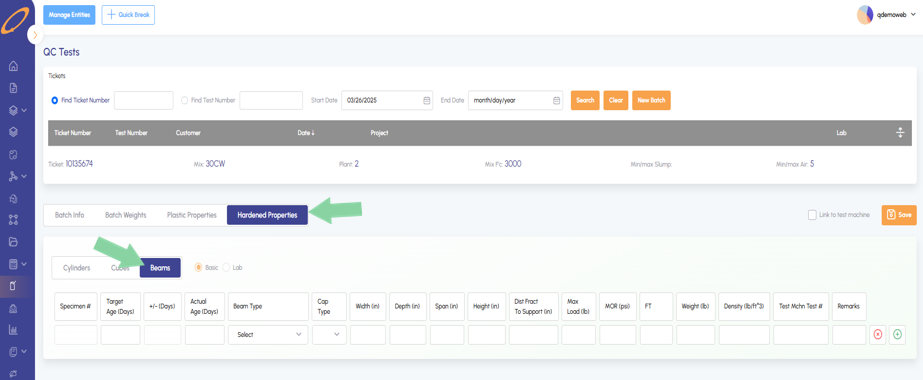
Beams are now available in a tickets hardened properties. - Cubes
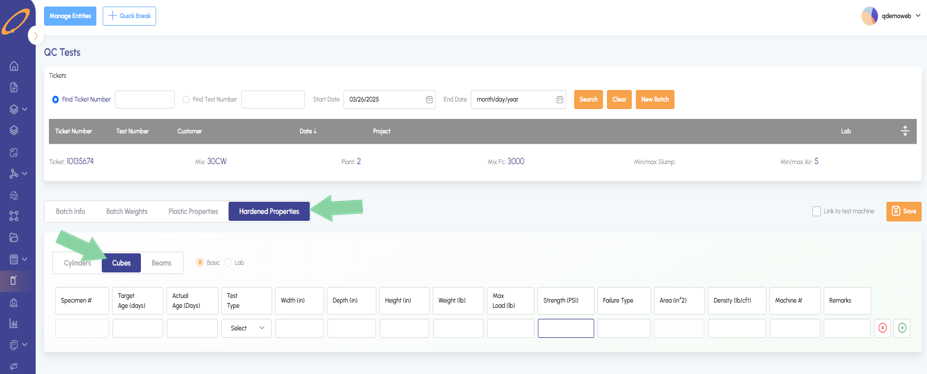
Cubes are now available in a tickets hardened properties. - Link to iInform from inside web Quadrel
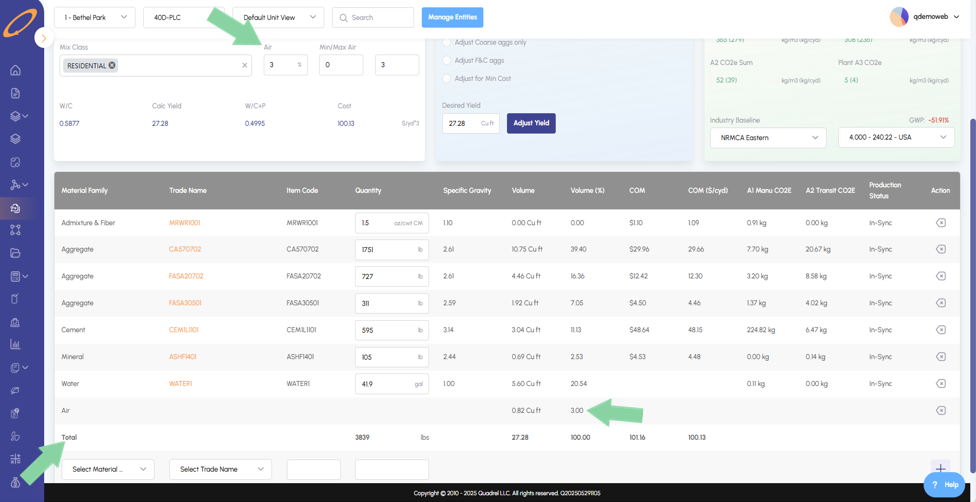
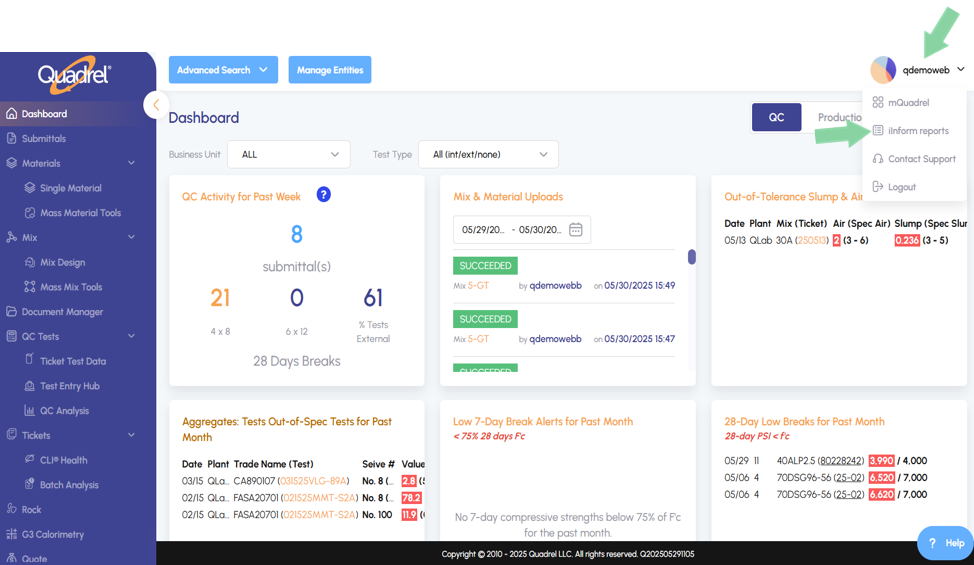
Shortcut to iInform from inside web Quadrel. - Mix Totals: Display of Air
Air percentage is now shown in the mix page as well as mix totals.
Mix Proportioning: Release 1.
On the mix design page, the Mix Proportioning tab is now available.
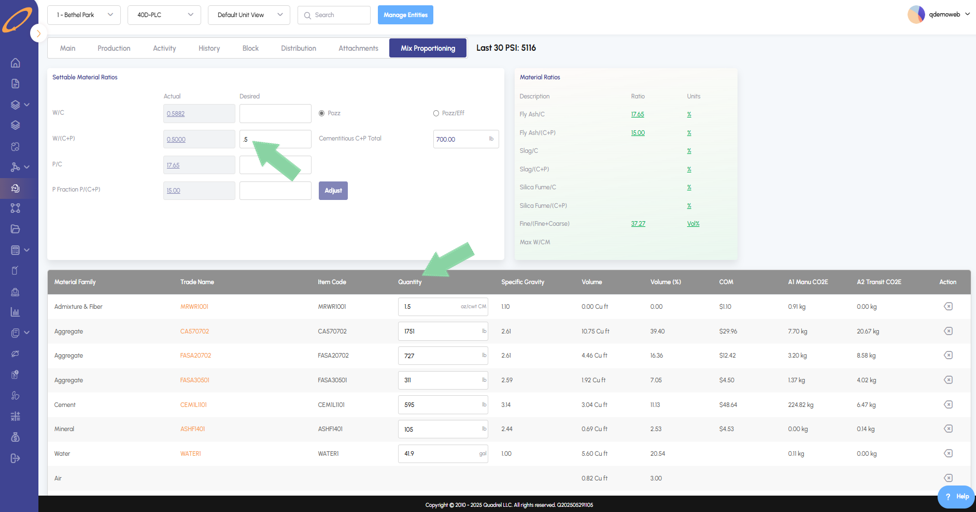
- Users can modify the W/(C+P) ratio by entering the desired value and clicking adjust. Then in the material table below, users will see the related material quantities adjusted accordingly.
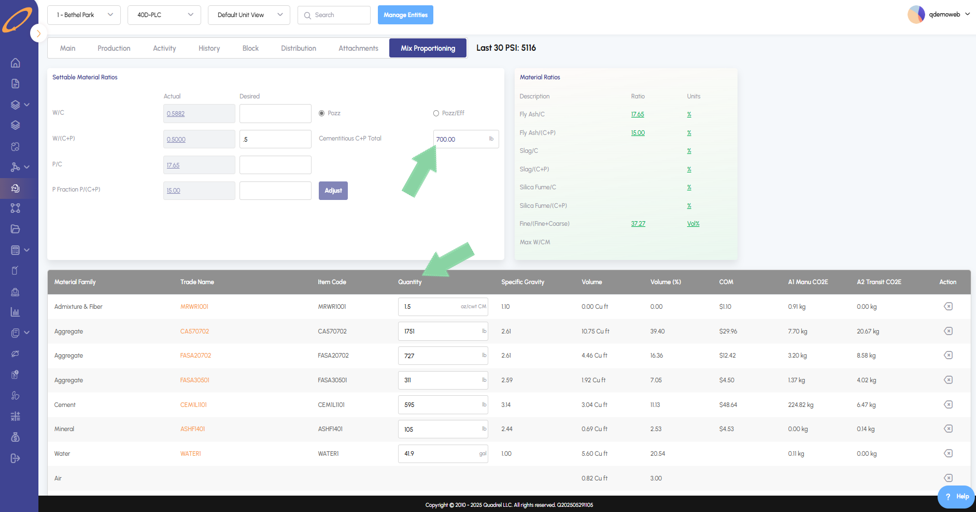
- Additionally, users can see the total amount of cementitious material (Cementitious C+P Total) and adjust it to the specification. After entering the desired value, click adjust. In the material table below, the related quantities will be updated accordingly.
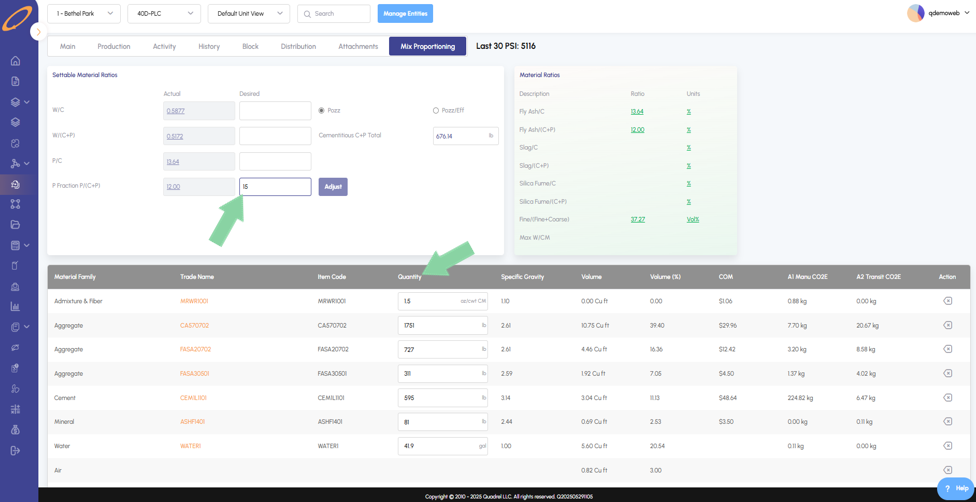
- Modify the P/(C+P) ratio in the last row, enter the new desired value, and click adjust to see the respective quantities update in the material table below.
Mass Yield.
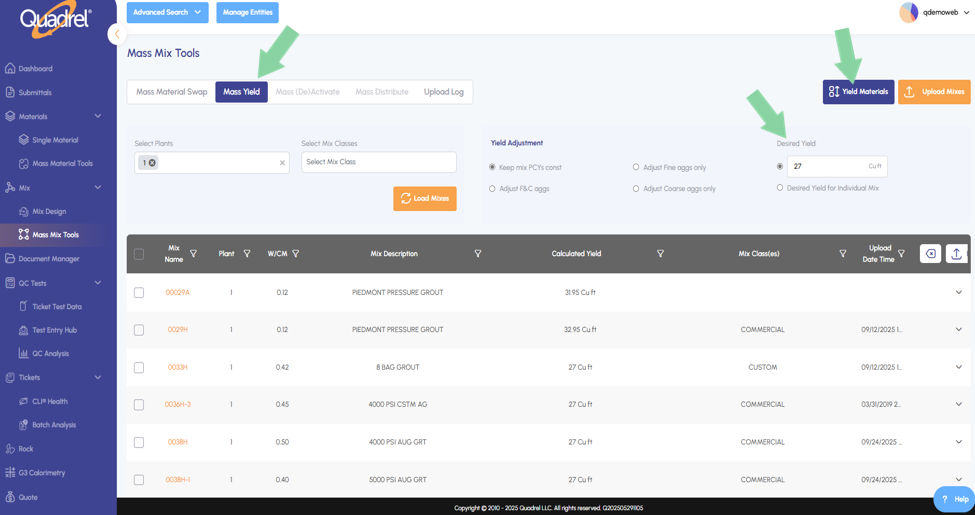
Mass yield is now in web Quadrel in the mass mix tools page. There are two methods to utilize the mass yield tool.
- Method 1: On the mass mix tools page switch to Mass Yield tab, search for mixes by plant and/or mix class and load mixes. Change the desired yield if desired by entering the value and clicking Yield Materials, be sure to upload mixes after changes.
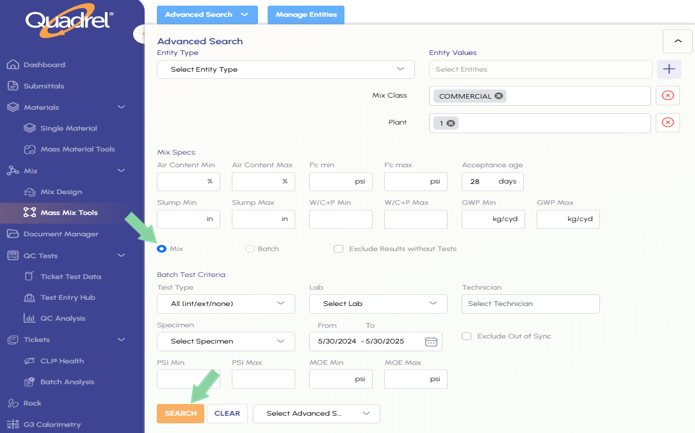
- Method 2: Use advanced search from the Mass Yield page, enter your desired mix criteria, ensure the mix radio button is selected, then press search to pull up mixes that meet the criteria.
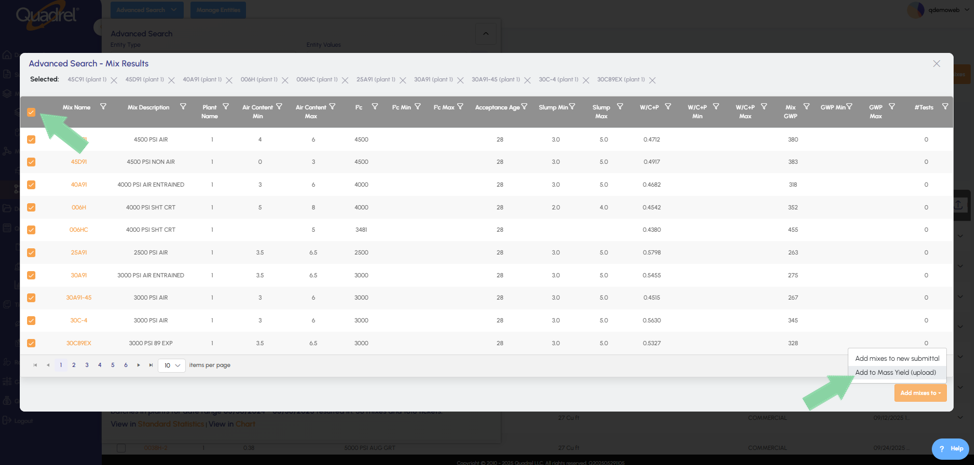
- When the matching mixes pop up, click the checkbox in the column header row to select all mixes as shown below.
- Click the lower right button "Add mixes to" and then click "Add to Mass Yield (Upload)".
- This will load all the searched mixes into the Mass Yield page.
G3 Improvements.
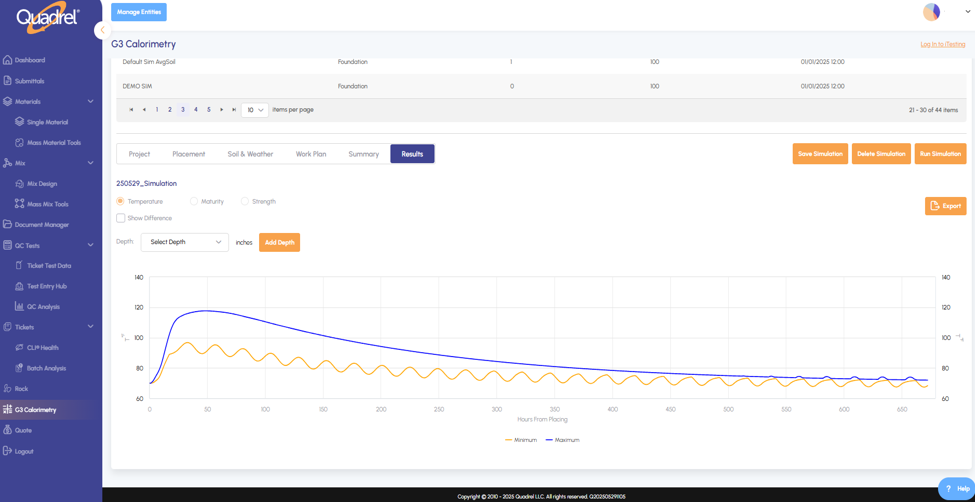
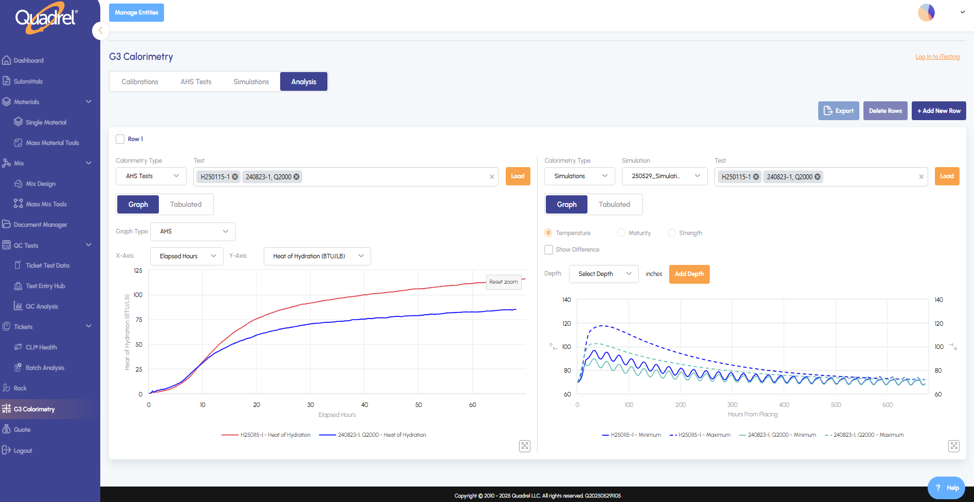
Added simulations to web Quadrel and the new Analysis tab to visually compare multiple calorimeter test at once.
In Simulations, users can create and save simulations to easily access them again.
- Configure the simulation name, placement information, soil & weather, work plan, and then run your simulated pour.
- Visualize the simulation by temperature, maturity, and strength. Users can add depth to the simulated pour if needed.
- Be alerted of cracking risk if detected in the simulation.
On the analysis tab, users can select AHS Tests or Simulations and plot multiple tests onto the same graph.
- Quickly add rows by clicking the Add New Row button or delete rows by selecting a rows checkbox and clicking Delete Rows.
CSA.
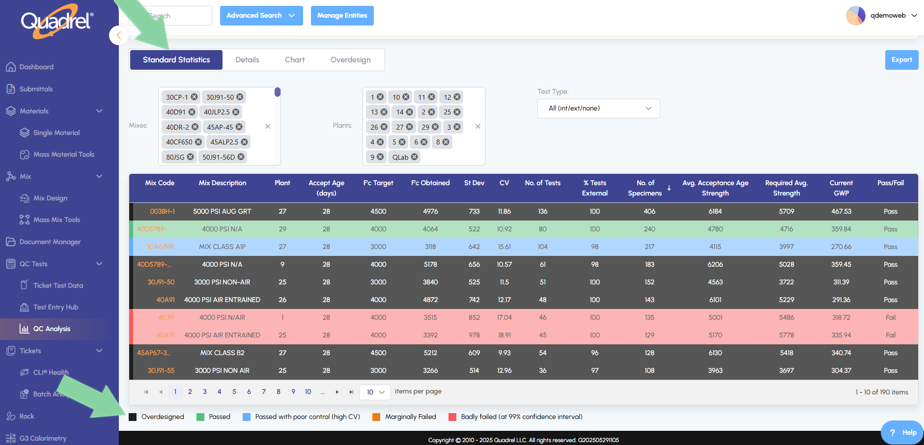
In QC Analysis, implemented CSA mix analysis for Canadian Quadrel users.
- Canadian Quadrel customers will now see mix analysis based on Canadian Standards Association (CSA).
- American Quadrel customers will continue to see mix analysis based on American Concrete Institute (ACI).
Lab Mode for 4x8 and 6x12.
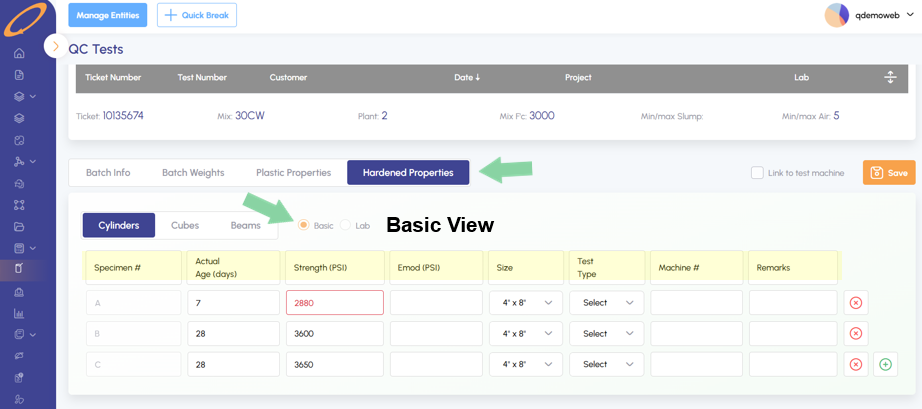
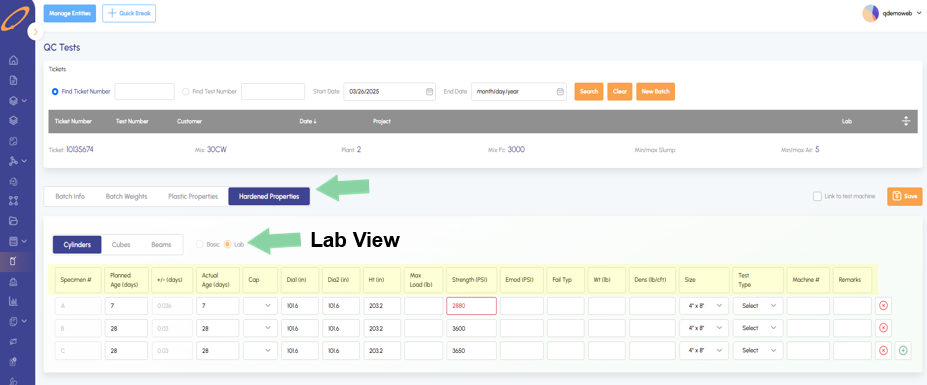
In a tickets hardened properties, Quadrel now supports Basic or Lab views while entering test data.
- In hardened properties, basic view. Quadrel users have less details to consider while still inputting all the essential test data.
- In lab view, several additional test parameters are shown to the user such as cap, diameter, height, weight, fracture type, and more.
Beams.
Users can now enter Beams into a tickets hardened properties. Hit the green plus at the end of the row to fill in data fields for each added row.
- Bend strength 3rd Point or Center Load
Cubes.
Users can now enter Cubes into a tickets hardened properties. Hit the green plus at the end of the row to fill in data fields for each added row.
- Options for general cube or specific size such as 100mm, 150mm, or 200mm.
Link to iInform from inside web Quadrel.
Users can click on their username to open the dropdown menu options. New option named iInform reports is a shortcut to users iInform reports.
- Enter your Quadrel username followed by "@iquadrel.xyz" and then the password.
- After successful login the page will display the report folder belonging to you.
Mix Totals: Display of Air.
After loading a mix in the Mix Design page, users can change the design air percentage and now see it included in the mix card after saving.
- The design air can be changed near the top of the mix design form, saved air percentages are now displayed in the mix card on the same page. Mix totals are now at the bottom of the mix card.