
07/10/2026 Patch: Submittal Improvements, Edit in Lab Scheduler, Etc.
- Submittals: Save on Generate
Submittal settings are now automatically saved before generating the report. This autosave happens seamlessly in the background when you click Generate. - Submittal Reports: Longer Ticket Numbers
The backup data section of submittal reports now supports ticket numbers up to 12 characters long, up from the previous limit. - Submittals: Highlight Cells while Tabbing Through
Navigating submittal fields just got easier — as you tab between fields, the active field is now highlighted with a blue border. This visual cue makes it simple to track your position and reduces data entry errors when moving quickly through forms. - Material Hub: Lot Number Support
A new lot number field has been added to the Additional tab in Material Hub, available across all material types. This allows for more precise tracking and traceability of materials by lot. - Test Entry Hub: Lab Schedule Edit
Provides access to previously saved tickets for a selected date, allowing users to review and make edits as needed. - Production Alerts: New Firing Logic Metrics
Added new firing logic metrics — Delta W/C, Delta W/C+P, Production Yield Ratio, and Quadrel Mix Not in Sync with Production — for setting up production alerts, giving users more options for defining when an alert should trigger. See below for details on the new metrics. - Production Alerts: Save More Than Ten Alerts
Removed the previous ten cap limit on firing logics (delta material weight, W/CM, production yield, etc.) you can setup per alert.
Submittals: Save on Generate.
- Submittals are now saved automatically during report generation, preventing data loss if generation is interrupted. When users click generate, Quadrel will automatically save during the generation process.

Submittal Reports: Longer Ticket Numbers.
- The backup data section of submittal reports now supports ticket numbers up to 12 characters long, up from the previous limit. This update accommodates longer ticket numbering formats used across different projects and organizations.
Submittals: Highlight Cells while Tabbing Through.
- Navigating submittal fields just got easier — as you tab between fields, the active field is now highlighted with a blue border. This visual cue makes it simple to track your position and reduces data entry errors when moving quickly through forms.

Material Hub: Lot Number Support.
- A new lot number field has been added to the Additional tab in Material Hub, available across all material types. This allows for more precise tracking and traceability of materials by lot.

Test Entry Hub: Lab schedule Edit.
- Users can now edit test entries directly from the lab schedule within the Test Entry Hub, eliminating the need to navigate elsewhere to make updates. This streamlines the workflow for managing and correcting lab schedule data.

Production Alerts: New Firing Logic Metrics.
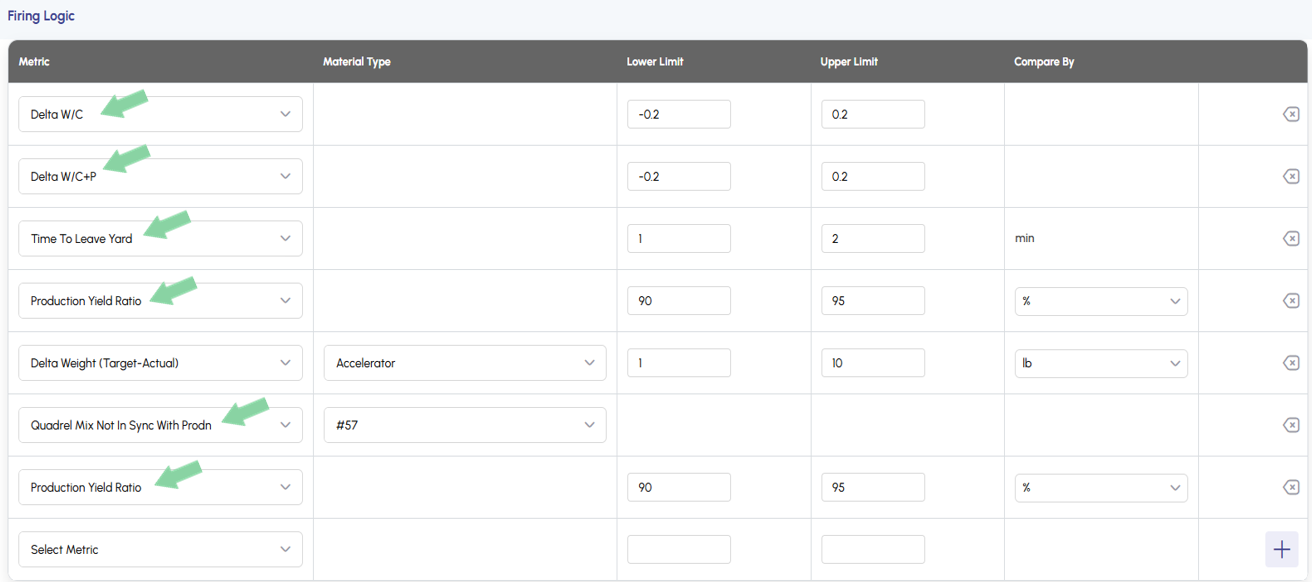
Added the following firing logic metrics to the dropdown selection menu for production alerts:
- Delta W/C — Fires when the actual water-to-cement ratio deviates from the target by a defined threshold.
- Delta W/C+P — Fires when the actual water-to-cementitious (cement + pozzolan) ratio deviates from the target by a defined threshold.
- Time To Leave Yard — Fires when the elapsed time before a truck leaves the yard exceeds a defined threshold.
- Production Yield Ratio — Fires when the actual yield deviates from the target yield ratio by a defined threshold.
- Quadrel Mix Not In Sync With Production — Fires when a change is made to cementitious or aggregate targets — at either the plant or dispatch level — after the mix was last sent from Quadrel to dispatch. Water and admix target changes do not trigger this alert, since those are often adjusted intentionally at the plant.
Production Alerts: Save More Than Ten Alerts.
- Removed the previous ten-alert cap on production alerts. Users can now save as many production alerts as they need.